MyMEXCards
MyMEX CardsMore than a card. A connected business.
Try 7 days free
← Back to the platform

Publish once and keep every customer experience current

Content Studio gives MyMEX workspaces a controlled way to publish useful content across cards, public pages and customer journeys.

GIVE THE BUSINESS CONTROL

A customer experience your team can manage.

Keep responsibility, business information and access clear as more people use the platform.

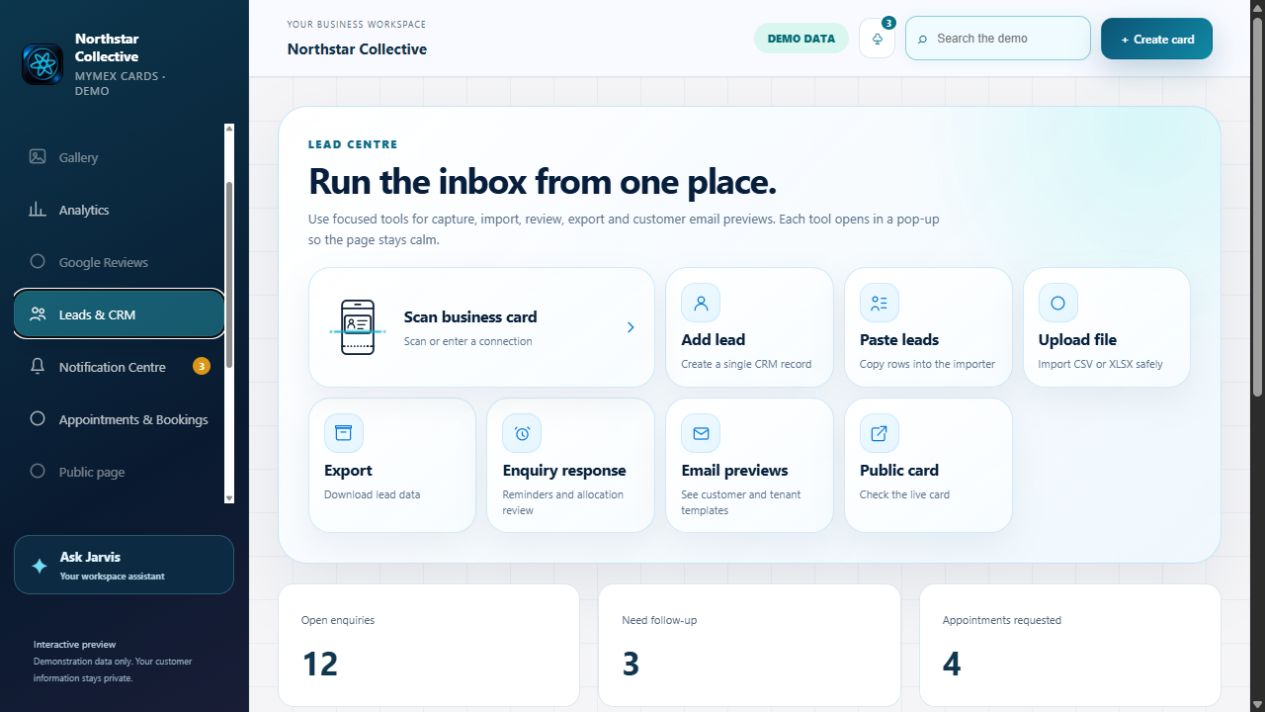
Existing MyMEX Lead Centre demonstration interface
Existing MyMEX demonstration · Fictional records
01 / RESPONSIBILITY

Know who owns the response.

Keep the request, responsible person and conversation history together in the relevant workspace.

02 / ACCESS

Appropriate access for each person.

Use staff invitations and role-based permissions to control who can view records, publish content and manage settings.

03 / CONSISTENCY

Keep the business recognisable.

Manage shared business branding, staff cards and approved information while private records stay separate from public content.

How do replies and customer updates stay controlled?

Configured branded communication and secure reply pages can keep responses linked to their history. Sender setup, customer preferences, consent and permissions determine what can be sent.

Read the customer workflow guide →
Explore the interactive workspace
02 / YOUR MANAGEMENT VIEW

Explore your team’s workspace.

For owners and sales directors: keep the business identity consistent, manage your representatives and see the enquiries and activity that need attention. Explore the platform below using demonstration data.

BRAND CONTROLOne business identity,
across your team.
MULTI-REP MANAGEMENTThe right people.
The right access.
PIPELINE VISIBILITYAn owner, a status
and a next action.
Overview — your business, in motionDemonstration profiles and example statistics. Explore safely; nothing is sent or saved.

ATTRACT AND INFORM

Make your business content work harder.

Publish useful information, give customers more ways to find it, and connect that interest to a relevant action.

YOUR WORKSPACE / ILLUSTRATIVE

Prepare. Review. Publish.

01
A business offering

Review the information, supporting media and customer action.

02
Publish now or schedule.

Use the supported workflow for Specials, Offerings and Listings.

03
Check the public result.

Keep dates, details and availability information current.
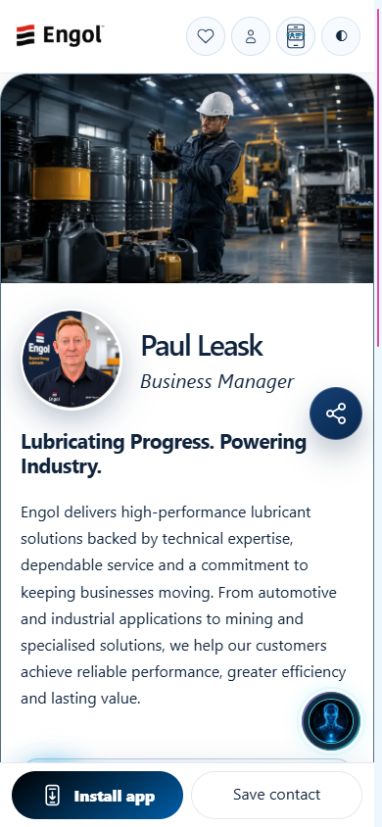
CUSTOMER EXPERIENCE / ILLUSTRATIVE

Your business, ready to explore.

Published details and relevant actions help a visitor decide what to do next.

Make an enquiry

Example result. No content is published from this preview.

BEYOND YOUR EXISTING CONTACTS

Built for public discovery.

Eligible business pages and published content are organised through sitemaps and relevant page metadata, helping search engines discover the public information.

What about Google indexing?

Sitemap inclusion helps discovery. It does not guarantee crawling, indexing or ranking. Published, submitted and confirmed indexed are different states; only report indexing where it is verified.

The public sitemap index was checked on 6 November 2026 and references ten child sitemaps. That is infrastructure evidence, not a traffic or ranking claim.

FROM A MEETING, COUNTER OR CAMPAIGN

One business. Several entry points.

Digital cards, QR displays, public pages and shared links give customers a route into the same business experience. Contact saving and supported PWA access help them return.

Sharing, reviews and paper-card capture

Create QR displays for the intended destination and Google Review displays for the correct business. Reviews remain the customer’s own opinion.

Scanning a paper business card starts a reviewable contact-capture workflow. Check extracted details; a scan does not provide marketing consent.

See the customer experience.

Choose a use case. Preview a real published card, then open it to explore the live experience.

Real published card preview for business services
Published card preview
Business services

From business information to a useful enquiry.

Help a customer explore services, ask Jarvis a question and reach the right contact.

  • Explore services
  • Ask Jarvis
  • Send an enquiry

Enquiry context can support your team’s review and follow-up.

Open the live example ↗

The preview is a capture of the published page. Open the live example for current content and actions.

Digital cardsCustomer enquiriesBookingsPublic pagesContentAnalyticsJarvis
One connected operating system

Your people. Your customers. One place to manage it.

See who asked for help, who will reply and what happens next. Update your team’s cards and business content. Manage booking requests, send branded replies and see what customers use. Jarvis helps your team along the way.

01A customer asksFrom a card, a public page or Jarvis
02Your team understandsInterest, context and a responsible person
03The next step happensA reply, a booking or a useful follow-up
Connected capabilities
Cards + public page

Give customers one current business profile.

Installable cards, QR sharing, vCards, responsive media and a public business page keep the team and current content easy to reach.

QRPublic pagePWA
Customer enquiries

Every enquiry has context and an owner.

Capture interests, assign responsibility, prepare branded replies and keep secure customer responses in one accountable history.

CRMSecure replyImport
Appointments + bookings

Turn customer intent into a confirmed next step.

Keep requests, booking types, ownership, status and appointment history together inside the correct business workspace.

CalendarStatusHistory
Content Studio

Publish once. Keep every experience current.

Manage galleries, Specials and Offerings, then let Jarvis read new campaign artwork only after an authorised person approves it.

GallerySpecialsOfferings
Analytics + notifications

Measure interest and bring customers back.

Track views, contact intent, installs and content engagement, then use consent-aware notifications with exact-page deep links.

AnalyticsPushDeep links
Team access

The right access for every role.

Invite team members, track opened and accepted links, manage shared assets and keep each business’s information private.

InvitesRolesTeams
Branded business email

Professional communication customers recognise.

Use verified email settings, branded footers, business contact details, secure reply pages and clear delivery evidence.

EmailPOPIADelivery
Guided launch

Know what to do next.

Jarvis guides the owner through business details, content and the first live card. Access depends on the verified invitation, trial or subscription status.

WelcomeProgressFirst card

How this works for your business

Reusable content

Manage media, galleries, Specials, Offerings, listings and campaign content from the workspace.

Controlled publishing

Review content before it becomes public or available for customer journeys.

Connected discovery

Customers can explore relevant business content directly from cards and public pages.

Jarvis support

Approved content can help Jarvis explain current services, products and offers.

Can content be reused across cards?

Yes. Shared content can support multiple cards and public experiences.

Can Jarvis read campaign artwork?

Jarvis can use approved visible wording where the workflow allows it.

Does publishing require review?

Important publishing actions remain controlled by authorised users.

Start my free trial →

Security & Trust

Security & Trust

Protection you can understand.

Layered safeguards help protect your account, payments and information while keeping responsibilities and limitations clear.

Controls reviewed 26 October 2026 · Reviews are ongoing
01

Account access

Login throttling limits repeated password guesses. Session expiry, revocation and active-user checks help stop stale access. Keep credentials private and remove staff access when responsibilities change.

02

Payment safeguards

Payment verification and duplicate-processing safeguards help prevent false payment activation and repeated billing. They do not guarantee protection against every payment dispute or fraud scenario.

03

Encrypted connections

HTTPS protects information travelling between your browser and MyMEX. Check the website address before signing in. HTTPS does not make a fraudulent website trustworthy.

04

Restricted system files

Private configuration and restricted file permissions help reduce unauthorized reading or changes to sensitive application files.

05

Recovery safeguards

Selected production database and application backups were restored and checked in isolation. Deployment rollback was rehearsed. Full restored-service business testing remains outstanding.

06

Ongoing review

Security reviews continue. Provider-level MFA enforcement, server patching, SSH and firewall policies, and immutable/off-site backup assurances have not yet been independently verified in this review.

07

Security is a shared responsibility

No online service eliminates every risk. Protect your credentials, review workspace access and report unexpected account or payment activity promptly. This page describes reviewed controls; it is not an independent certification or a guarantee that every platform route has been audited.

08

Report a security concern

Use our support form to request a private security follow-up. Describe the affected page and what happened. Do not send passwords, API keys, payment details or customer records. For sensitive evidence, ask support for an appropriate private channel first.

Platform terms · Privacy notice

MyMEX Security & Trust · Reviewed controls, clear limitations and ongoing improvement.