MyMEXCards
MyMEX CardsMore than a card. A connected business.
Try 7 days free
← Back to the platform

Manage every team member's digital card from one workspace

MyMEX gives businesses a shared workspace for cards, staff access, brand settings, public content and customer activity.

GIVE THE BUSINESS CONTROL

A customer experience your team can manage.

Keep responsibility, business information and access clear as more people use the platform.

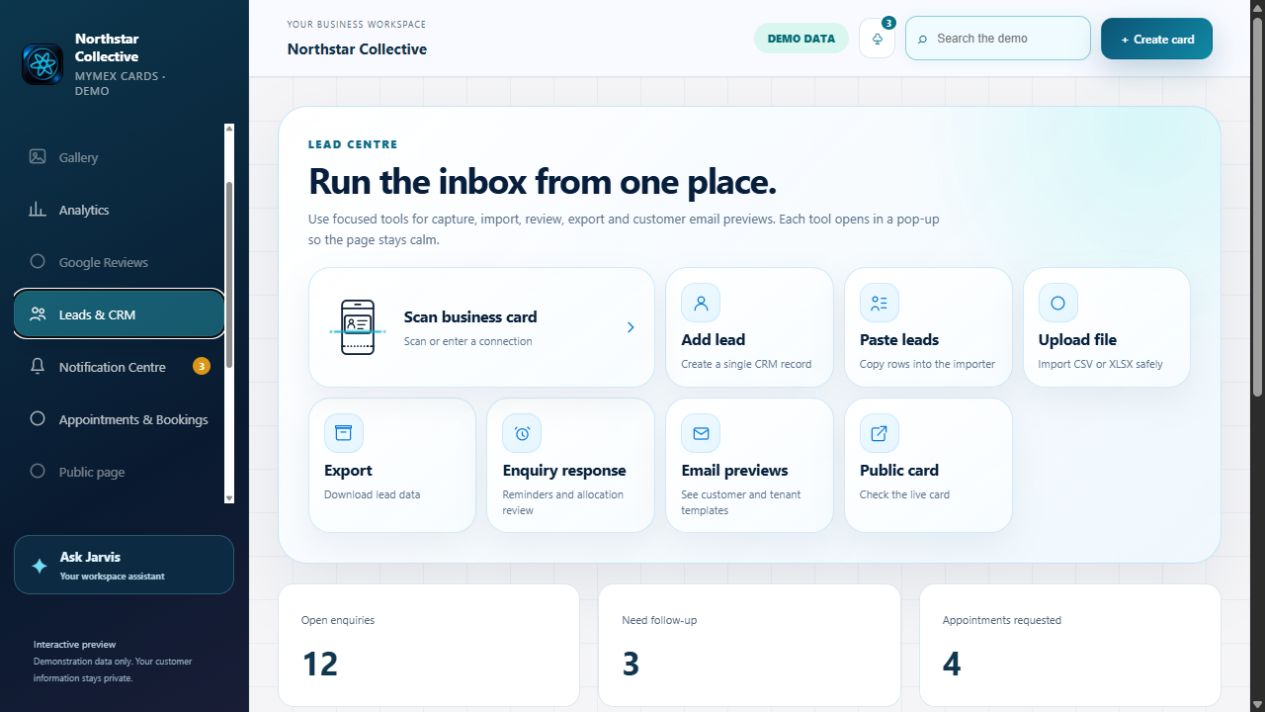
Existing MyMEX Lead Centre demonstration interface
Existing MyMEX demonstration · Fictional records
01 / RESPONSIBILITY

Know who owns the response.

Keep the request, responsible person and conversation history together in the relevant workspace.

02 / ACCESS

Appropriate access for each person.

Use staff invitations and role-based permissions to control who can view records, publish content and manage settings.

03 / CONSISTENCY

Keep the business recognisable.

Manage shared business branding, staff cards and approved information while private records stay separate from public content.

How do replies and customer updates stay controlled?

Configured branded communication and secure reply pages can keep responses linked to their history. Sender setup, customer preferences, consent and permissions determine what can be sent.

Read the customer workflow guide →
Explore the interactive workspace
02 / YOUR MANAGEMENT VIEW

Explore your team’s workspace.

For owners and sales directors: keep the business identity consistent, manage your representatives and see the enquiries and activity that need attention. Explore the platform below using demonstration data.

BRAND CONTROLOne business identity,
across your team.
MULTI-REP MANAGEMENTThe right people.
The right access.
PIPELINE VISIBILITYAn owner, a status
and a next action.
Overview — your business, in motionDemonstration profiles and example statistics. Explore safely; nothing is sent or saved.
Technology that leads back to people

Connect with a person. Keep the relationship moving.

Someone scans your card. They find the person, product or service they need. Your team can carry the conversation forward without starting from scratch.

ConnectUnderstandFollow upGrow
01 / YOUR PEOPLE. ONE USEFUL CONNECTION.

Give Every Introduction a Clear Next Step

Each person’s digital card opens a mobile-friendly business profile from a link, QR code or NFC tap. Customers can save contact details, explore published information, ask a question or request a booking. Try the published cards below.

Paul LeaskEngol GroupPreview the published card layout, or open the full published card.
01

Your latest details. Always within reach.

Share by QR, NFC or a link. Update the profile once instead of replacing printed cards.

Benefit: a polished introduction that stays current.
02

A next step customers can understand.

Contact buttons, services and booking options make it clear what to do. Jarvis helps explain the choices.

Benefit: less friction between interest and enquiry.
03

A conversation your team can follow up.

Approved enquiries retain their context and responsible person in the workspace.

Benefit: your team knows who needs help and why.
CONNECTED WORKSPACE · ILLUSTRATIVE

The published experience. Your team’s connection.

Browse the real card layout, QR code, current content and navigation. Customer actions follow the business’s normal permissions and consent.

One card → useful context → your team

How this works for your business

Shared brand control

Keep logos, colours, business details and public content consistent before team members publish cards.

Role-aware access

Invite the right people, keep admin tools protected and separate workspace access from platform administration.

Team visibility

See staff cards, activity, invitations and customer follow-up in one operational view.

Reusable assets

Use shared media, Specials, Offerings and business knowledge across the team without rebuilding each card.

Can each staff member have a card?

Yes. MyMEX is built around active cards, so a workspace can grow with the team.

Can users see another business's data?

No. Workspace isolation keeps business data separated.

Can the owner manage shared content?

Yes. Shared assets and content can feed public cards and business pages.

Start my free trial →

Security & Trust

Security & Trust

Protection you can understand.

Layered safeguards help protect your account, payments and information while keeping responsibilities and limitations clear.

Controls reviewed 26 October 2026 · Reviews are ongoing
01

Account access

Login throttling limits repeated password guesses. Session expiry, revocation and active-user checks help stop stale access. Keep credentials private and remove staff access when responsibilities change.

02

Payment safeguards

Payment verification and duplicate-processing safeguards help prevent false payment activation and repeated billing. They do not guarantee protection against every payment dispute or fraud scenario.

03

Encrypted connections

HTTPS protects information travelling between your browser and MyMEX. Check the website address before signing in. HTTPS does not make a fraudulent website trustworthy.

04

Restricted system files

Private configuration and restricted file permissions help reduce unauthorized reading or changes to sensitive application files.

05

Recovery safeguards

Selected production database and application backups were restored and checked in isolation. Deployment rollback was rehearsed. Full restored-service business testing remains outstanding.

06

Ongoing review

Security reviews continue. Provider-level MFA enforcement, server patching, SSH and firewall policies, and immutable/off-site backup assurances have not yet been independently verified in this review.

07

Security is a shared responsibility

No online service eliminates every risk. Protect your credentials, review workspace access and report unexpected account or payment activity promptly. This page describes reviewed controls; it is not an independent certification or a guarantee that every platform route has been audited.

08

Report a security concern

Use our support form to request a private security follow-up. Describe the affected page and what happened. Do not send passwords, API keys, payment details or customer records. For sensitive evidence, ask support for an appropriate private channel first.

Platform terms · Privacy notice

MyMEX Security & Trust · Reviewed controls, clear limitations and ongoing improvement.