Digital business cards built for real customer engagement
A MyMEX digital card is a shareable business identity, a customer entry point and a measurable follow-up path in one connected experience.
ATTRACT AND INFORM
Make your business content work harder.
Publish useful information, give customers more ways to find it, and connect that interest to a relevant action.
YOUR WORKSPACE / ILLUSTRATIVE
Prepare. Review. Publish.
01
A business offering
Review the information, supporting media and customer action.
02
Publish now or schedule.
Use the supported workflow for Specials, Offerings and Listings.
03
Check the public result.
Keep dates, details and availability information current.
CUSTOMER EXPERIENCE / ILLUSTRATIVE
Your business, ready to explore.
Published details and relevant actions help a visitor decide what to do next.
Make an enquiry→
Example result. No content is published from this preview.
BEYOND YOUR EXISTING CONTACTS
Built for public discovery.
Eligible business pages and published content are organised through sitemaps and relevant page metadata, helping search engines discover the public information.
What about Google indexing?
Sitemap inclusion helps discovery. It does not guarantee crawling, indexing or ranking. Published, submitted and confirmed indexed are different states; only report indexing where it is verified.
The public sitemap index was checked on 6 November 2026 and references ten child sitemaps. That is infrastructure evidence, not a traffic or ranking claim.
FROM A MEETING, COUNTER OR CAMPAIGN
One business. Several entry points.
Digital cards, QR displays, public pages and shared links give customers a route into the same business experience. Contact saving and supported PWA access help them return.
Sharing, reviews and paper-card capture
Create QR displays for the intended destination and Google Review displays for the correct business. Reviews remain the customer’s own opinion.
Scanning a paper business card starts a reviewable contact-capture workflow. Check extracted details; a scan does not provide marketing consent.
See the customer experience.
Choose a use case. Preview a real published card, then open it to explore the live experience.
The preview is a capture of the published page. Open the live example for current content and actions.
01 / YOUR PEOPLE. ONE USEFUL CONNECTION.
Give Every Introduction a Clear Next Step
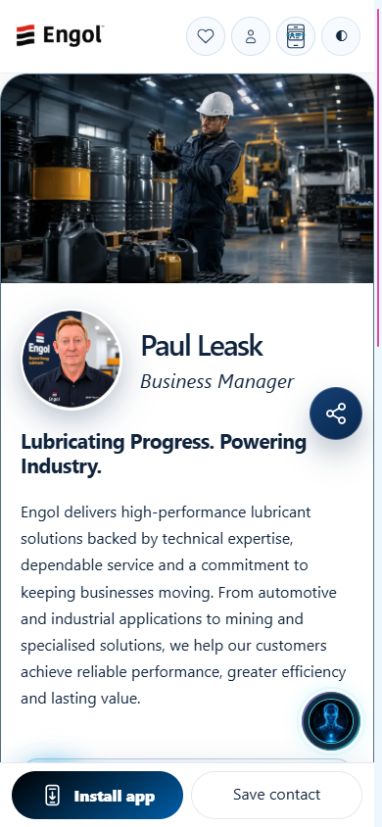
Each person’s digital card opens a mobile-friendly business profile from a link, QR code or NFC tap. Customers can save contact details, explore published information, ask a question or request a booking. Try the published cards below.
Saved public-page preview. Open the published example for live interactions.
Paul LeaskBusiness Manager
Building relationships. Creating opportunities.
Explore current business information, contact options and the next step—all in one live card experience.
What would you like to do?
Explore the card actions. Nothing is sent from this preview.
Share by QR, NFC or a link. Update the profile once instead of replacing printed cards.
Benefit: a polished introduction that stays current.
02
A next step customers can understand.
Contact buttons, services and booking options make it clear what to do. Jarvis helps explain the choices.
Benefit: less friction between interest and enquiry.
03
A conversation your team can follow up.
Approved enquiries retain their context and responsible person in the workspace.
Benefit: your team knows who needs help and why.
CONNECTED WORKSPACE · ILLUSTRATIVE
The published experience. Your team’s connection.
Browse the real card layout, QR code, current content and navigation. Customer actions follow the business’s normal permissions and consent.
How this works for your business
Share more than contact details
Show a current profile, useful actions, content, offers and the business context customers need before they contact you.
Connect every action
Calls, messages, booking requests, saved contacts and content interest can become part of the customer history.
Keep the card current
Workspace owners can update media, actions, Specials, Offerings and profile details without reprinting a card.
Guide the next step
Jarvis can explain the business, qualify intent and help the team respond from approved knowledge.
Is MyMEX just a digital business card?
No. The card is the front door, but the platform also connects enquiries, content, CRM, analytics, bookings, Google review QR tools and Jarvis guidance.
Can one person use it?
Yes. A single professional can start with one active card, then add team cards when the business grows.
Can customers save contact details?
Yes. The public card experience supports contact saving and sharing while keeping the wider journey connected.